加入会议

手册分类 
- 1. 禅道介绍
- 1.1 关于禅道项目管理软件
- 1.2 如何获得支持
- 1.3 各版本功能差异
- 1.4 关注我们
- 1.2 如何获得支持
- 2. 安装禅道
- 2.1. 环境搭建
- 2.1.1 搭建Ubuntu环境安装禅道
- 2.1.2 搭建Centos环境安装禅道
- 2.1.3 安装PHP的ioncube扩展
- 2.1.2 搭建Centos环境安装禅道
- 2.2. 安装禅道
- 2.2.1 选择适合您的安装方法
- 2.2.2 新版本禅道的安装升级
- 2.2.3 Win一键安装包(安装版)
- 2.2.4 Win一键安装包(免安装版)
- 2.2.5 linux用一键安装包(免安装版)
- 2.2.6 使用源码包安装(各系统通用)
- 2.2.7 使用源码包安装(MAC系统)
- 2.2.8 基于禅道当前的一键安装包(Windows和Linux)如何源码安装旗舰版禅道
- 2.2.9 渠成命令行安装禅道
- 2.2.10 Docker和Kubernetes方式部署禅道
- 2.2.11 linux使用z命令安装
- 2.2.2 新版本禅道的安装升级
- 2.3 安装PHP的LDAP扩展
- 2.4 在线安装云禅道
- 2.5 安装 APCu扩展
- 2.6 安装DuckDB引擎
- 2.7. 信创支持
- 2.7.1 OceanBase数据库
- 2.8. 安装文档协同服务
- 2.8.1 安装Windows协同服务
- 2.8.2 安装Linux协同服务
- 2.1.1 搭建Ubuntu环境安装禅道
- 3. 升级禅道
- 3.1. 升级禅道新版本
- 3.1.1 选择和自己环境对应的升级方式
- 3.1.2 通过源代码方式升级(通用)
- 3.1.3 windows一键安装包的升级
- 3.1.4 linux一键安装包升级
- 3.1.5 docker安装禅道-升级禅道
- 3.1.6 旧版Docker镜像升级说明
- 3.1.7 通过Roadrunner管理定时任务
- 3.1.8 windows一键包升级到禅道22.6(内置DevOps)
- 3.1.9 Linux一键包升级到禅道22.6(内置DevOps)
- 3.1.10 如何通过Docker联网部署GitFox
- 3.1.2 通过源代码方式升级(通用)
- 3.2 如何安装ioncube扩展
- 3.1.1 选择和自己环境对应的升级方式
- 4. 维护配置
- 4.1. 维护禅道
- 4.1.1 初始化管理脚本
- 4.1.2 备份禅道
- 4.1.3 恢复删除的资源
- 4.1.4 如何更新燃尽图
- 4.1.5 一键安装包如何实现mysql异机连接
- 4.1.6 linux一键安装包配置https
- 4.1.7 禅道一键安装包迁移/更新禅道一键安装包
- 4.1.8 Windows一键安装包配置https
- 4.9 禅道旧Windows一键安装包迁移到新Windows一键安装包的步骤
- 4.1.2 备份禅道
- 4.2. 配置禅道
- 4.2.1 设置是否允许匿名访问
- 4.2.2 如何配置email发信
- 4.2.3 如何成为超级管理员
- 4.2.4 配置禅道系统为静态访问
- 4.2.5 去掉禅道访问地址中的zentao
- 4.2.6 linux一键安装包去掉禅道访问地址中的zentao
- 4.2.7 集成禅道和svn
- 4.2.8 集成禅道和git
- 4.2.9 在第三方应用中集成禅道
- 4.2.10 第三方应用配置免密登录禅道
- 4.2.11 第三方应用集成禅道客户端进行消息通知
- 4.2.12 集成webhook
- 4.2.13 集成ZDOO
- 4.2.14 客户端集成
- 4.2.15 浏览器通知的设置
- 4.2.16 集成钉钉工作消息通知
- 4.2.17 集成企业微信应用消息通知
- 4.2.18 集成企业微信群机器人
- 4.2.19 集成飞书群机器人
- 4.2.20 集成飞书消息通知
- 4.2.21 配置飞书内的禅道单点登录
- 4.2.22 解决一键安装包密码口令弱的问题
- 4.2.2 如何配置email发信
- 4.3. 性能优化
- 4.3.1 nginx反向代理禅道502或504bad gateway错误
- 4.3.2 linux系统中配置session使用redis
- 4.3.3 缓存功能
- 4.3.2 linux系统中配置session使用redis
- 4.1.1 初始化管理脚本
- 5. 快速入门
- 5.1. 新版本快速入门
- 5.1.1 20版本禅道的新增功能
- 5.1.2 新版本禅道的最简使用
- 5.1.3 20版本禅道的界面变化
- 5.1.2 新版本禅道的最简使用
- 5.1.1 20版本禅道的新增功能
- 6. 按照角色使用
- 6.1. 管理员
- 6.2. 项目集负责人
- 6.3. 产品经理
- 6.3.1 维护模块
- 6.3.2 产品多分支/平台管理
- 6.3.3 维护计划
- 6.3.4 维护需求
- 7.5.5 需求的状态和研发阶段
- 6.3.6 创建发布
- 6.3.7 跟踪进度
- 6.3.8 反馈管理(企业版)
- 6.3.2 产品多分支/平台管理
- 6.4. 项目经理
- 6.4.1 维护项目和执行
- 6.4.2 维护团队
- 6.4.3 关联需求
- 6.4.4 跟踪进度
- 6.4.5 瀑布项目的使用
- 6.4.6. 瀑布项目
- 6.4.6.1 维护项目的计划、阶段
- 6.4.6.2 项目设计
- 6.4.6.3 项目构建
- 6.4.6.4 项目矩阵
- 6.4.6.5 项目基线
- 6.4.6.6 项目变更
- 6.4.6.7 项目周报、挣值管理
- 6.4.6.8 项目调研
- 6.4.6.9 项目估算
- 6.4.6.10 项目机会
- 6.4.6.11 项目问题
- 6.4.6.12 项目风险
- 6.4.6.13 项目培训
- 6.4.6.14 项目会议
- 6.4.6.15 项目过程
- 6.4.6.16 项目QA
- 6.4.6.2 项目设计
- 6.4.7 看板项目的使用
- 6.4.8 融合敏捷项目
- 6.4.9 融合瀑布项目
- 6.4.10 甘特图(企业版)
- 6.4.11 代码评审(企业版)
- 6.4.12 项目报告
- 6.4.13 Excel 导入导出(企业版)
- 6.4.14 Word 导出(企业版)
- 6.4.15 资产库管理
- 6.4.16 项目模板
- 6.4.2 维护团队
- 6.5. 研发人员
- 6.5.1 参加产品计划会议,分解任务
- 6.5.2 领取任务,并每天更新任务
- 6.5.3 创建构建,提交测试
- 6.5.4 确认Bug,解决Bug
- 6.5.5 执行的综合、需求、Bug、任务看板
- 6.5.2 领取任务,并每天更新任务
- 6.6. 测试人员
- 6.2. 项目集负责人
- 7. 功能介绍
- 7.1. 核心管理结构
- 7.1.1 项目集(Program)
- 7.1.2 项目(Project)
- 7.1.3 产品(Product)
- 7.1.4 执行(Execution)
- 7.1.5 管理模型
- 7.1.2 项目(Project)
- 7.2. 地盘
- 7.2.1 新手引导
- 7.2.2 全局添加
- 7.2.3 消息中心
- 7.2.4 工作日志
- 7.2.5 地盘-项目、执行
- 7.2.6 地盘-待处理、贡献、动态
- 7.2.7 地盘-审批
- 7.2.8 联系人
- 7.2.9 会议
- 7.2.2 全局添加
- 7.3. 项目集
- 7.4. 规划
- 7.5. 产品
- 7.5.1 创建产品
- 7.5.2 维护模块
- 7.5.3 产品多分支/平台管理
- 7.5.4 维护计划
- 7.5.5 维护需求
- 7.5.6 需求的评审
- 7.5.7 需求的状态和研发阶段
- 7.5.8 创建发布
- 7.5.9 路线图
- 7.5.10 跟踪进度
- 7.5.11 业务需求&需求多层级
- 7.5.12 产品空间
- 7.5.2 维护模块
- 7.6. 项目
- 7.6.1 Scrum项目
- 7.6.2. 瀑布项目
- 7.6.2.1 维护项目的阶段
- 7.6.2.2 项目设计
- 7.6.2.3 项目矩阵
- 7.6.2.4 项目周报、挣值管理
- 7.6.2.5 项目基线
- 7.6.2.6 项目变更
- 7.6.2.7 项目调研
- 7.6.2.8 项目估算
- 7.6.2.9 项目培训
- 7.6.2.2 项目设计
- 7.6.3 看板项目
- 7.6.4 融合敏捷项目
- 7.6.5 融合瀑布项目
- 7.6.6 IPD项目
- 7.6.7. 项目通用功能
- 7.6.7.1 项目的基本设置
- 7.6.7.2 维护项目的执行
- 7.6.7.3 维护项目的需求
- 7.6.7.4 项目构建
- 7.6.7.5 维护项目的Bug、用例、测试单、测试报告
- 7.6.7.6 维护项目的文档
- 7.6.7.7 维护项目的发布
- 7.6.7.8 项目报告
- 7.6.7.9 项目会议
- 7.6.7.10 项目风险
- 7.6.7.11 项目问题
- 7.6.7.12 项目机会
- 7.6.7.13 项目交付物
- 7.6.7.14 项目评审
- 7.6.7.15 项目过程
- 7.6.7.16 交付物
- 7.6.7.17 质量保证
- 7.6.7.18 单个项目流程管理
- 7.6.7.19 项目空间
- 7.6.7.20 项目甘特图
- 7.6.7.2 维护项目的执行
- 7.6.8 项目模板
- 7.6.9 项目资源日历(插件)
- 7.6.10 成本预算(插件)
- 7.6.2. 瀑布项目
- 7.7. 执行
- 7.7.1 参加产品计划会议,分解任务
- 7.7.2 领取任务,并每天更新任务
- 7.7.3 创建构建,提交测试
- 7.7.4 确认Bug,解决Bug
- 7.7.5 执行的综合、需求、Bug、任务看板
- 7.7.6 执行空间
- 7.7.2 领取任务,并每天更新任务
- 7.8. 测试
- 7.9. 自动化测试
- 7.10 DevOps(解决方案)
- 7.11. 文档
- 7.11.1 仪表盘
- 7.11.2 我的空间
- 7.11.3 团队空间
- 7.11.4 产品空间
- 7.11.5 项目空间
- 7.11.6 接口空间
- 7.11.7 接口文档
- 7.11.8 文档维护
- 7.11.9 文档编辑器
- 7.11.10 文档集成
- 7.11.11 文档多人协作
- 7.11.12 文档模板
- 7.11.2 我的空间
- 7.12. AI
- 7.12.1 智能会话
- 7.12.2 禅道智能体
- 7.12.3 项目定时智能体
- 7.12.4 通用智能体
- 7.12.5 技能管理
- 7.12.6 AI知识库
- 7.12.7 模型列表
- 7.12.8 ZAI服务安装
- 7.12.9 ZAI服务控制面板使用
- 7.12.10 ZAI配置
- 7.12.11 数字员工(AI增强版)
- 7.12.12 禅道skills
- 7.12.13 禅道CLI
- 7.12.2 禅道智能体
- 7.13. BI
- 7.13.1 维度(企业版8.4+)
- 7.13.2 大屏(企业版8.4+)
- 7.13.3 透视表
- 7.13.4. 度量项
- 7.13.4.1 查看度量项
- 7.13.4.2 创建度量项
- 7.13.4.3 度量项编码开发操作手册
- 7.13.4.2 创建度量项
- 7.13.5 透视表下钻
- 7.13.6. 大屏设计器
- 7.13.6.1 大屏设计器界面布局
- 7.13.6.2 大屏设计器引用图表
- 7.13.6.3 大屏设计器引用透视表
- 7.13.6.4 配置全局筛选器
- 7.13.6.2 大屏设计器引用图表
- 7.13.7 图表
- 7.13.8 数据表(企业版8.4+)
- 7.13.9 报告模板
- 7.13.2 大屏(企业版8.4+)
- 7.14. 看板
- 7.14.1 通用看板功能
- 7.15. 组织
- 7.15.1 团队成员和工作信息
- 7.15.2 人力资源日历(需安装插件)
- 7.15.3 组织动态
- 7.15.4 公司信息
- 7.15.2 人力资源日历(需安装插件)
- 7.16. 反馈
- 7.17. 后台设置
- 7.17.1 后台首页
- 7.17.2. 系统设置
- 7.17.2.1 模式
- 7.17.2.2 备份
- 7.17.2.3 回收站
- 7.17.2.4 聊天
- 7.17.2.5 授权
- 7.17.2.6 安全
- 7.17.2.7 定时
- 7.17.2.8 时区
- 7.17.2.9 重建索引
- 7.17.2.10 LDAP
- 7.17.2.11 表引擎
- 7.17.2.12 Office
- 7.17.2.2 备份
- 7.17.3 功能开关
- 7.17.4. 人员管理
- 7.17.5. 功能配置
- 7.17.5.1 地盘
- 7.17.5.2 产品
- 7.17.5.3 执行
- 7.17.5.4 项目
- 7.17.5.5 测试
- 7.17.5.6 看板
- 7.17.5.7 文档
- 7.17.5.8 反馈
- 7.17.5.9 用户
- 7.17.5.10 工单
- 7.17.5.11 度量
- 7.17.5.12 对象关联关系(企业版11.1)
- 7.17.5.13 会议室
- 7.17.5.2 产品
- 7.17.6. 通知设置
- 7.17.7. 项目流程
- 7.17.7.1 产品流程
- 7.17.7.2. 项目流程
- 7.17.7.2.1 项目流程
- 7.17.7.2.2 功能开关
- 7.17.7.2.3 过程定义
- 7.17.7.2.4 质量保证
- 7.17.7.2.5 交付物类型
- 7.17.7.2.6 阶段列表
- 7.17.7.2.7 评审流程
- 7.17.7.2.8 工作流
- 7.17.7.2.2 功能开关
- 7.17.7.3. 工作流
- 7.17.7.4 审批流
- 7.17.7.2. 项目流程
- 7.17.8 插件管理
- 7.17.9 二次开发
- 7.17.10 Jira数据导入
- 7.17.11 Jira数据导入--数据迁移说明
- 7.17.12. 权限维护和控制
- 7.17.12.1 项目集的权限维护和访问控制
- 7.17.12.2 产品的权限维护和访问控制
- 7.17.12.3 项目的权限维护和访问控制
- 7.17.12.4 执行的权限维护和访问控制
- 7.17.12.5 项目和执行的访问控制和数据关系
- 7.17.12.2 产品的权限维护和访问控制
- 7.17.13 Confluence数据导入
- 7.17.2. 系统设置
- 7.18. 客户端增强版会议SRS
- 7.18.1. 音视频会议配置
- 7.18.1.1 安装音视频服务端
- 7.18.1.2 安装SRS音视频服务端
- 7.18.1.3 开启和配置音视频功能
- 7.18.1.2 安装SRS音视频服务端
- 7.18.2. 发起会议
- 7.18.2.1 一对一会话中发起音视频会议
- 7.18.2.2 群组会话中发起音视频会议
- 7.18.2.3 独立发起音视频会议入口
- 7.18.2.2 群组会话中发起音视频会议
- 7.18.3. 加入会议
- 7.18.3.1 分享音视频会议到会话
- 7.18.3.2 通过会议的ID加入会议
- 7.18.4. 预约会议
- 7.18.4.1 预约会议
- 7.18.5. 会议应用
- 7.18.5.1 音视频会议应用
- 7.18.1.1 安装音视频服务端
- 7.19. 客户端增强版会议Jitsi
- 7.19.1. 安装升级
- 7.19.1.1 安装 Jitsi 音视频服务端
- 7.19.1.2 后台配置
- 7.19.2. 功能介绍
- 7.19.1.1 安装 Jitsi 音视频服务端
- 7.20. 学堂
- 7.21. 资产库(旗舰版)
- 7.21.1 资产库管理(旗舰版)
- 7.22. 办公
- 7.1.1 项目集(Program)
- 8. 其他相关
- 8.1. 其他
- 8.1.1 禅道所使用到的第三方代码
- 8.1.2 禅道FAQ
- 8.1.3 如何帮助禅道项目
- 8.1.4 禅道商业服务
- 8.1.5 禅道项目的贡献者
- 8.1.6 历史修改记录
- 8.1.7 禅道对象名称的重名规则
- 8.1.2 禅道FAQ
- 8.1.1 禅道所使用到的第三方代码
- 9. IPD版本功能介绍
- 9.1. 禅道IPD版介绍
- 9.1.1 关于禅道IPD版
- 9.1.2 禅道IPD版的核心流程
- 9.2. IPD版的安装和升级
- 9.2.1 选择适合您的安装方法
- 9.2.2 选择适合您的升级方法
- 9.3. 需求与市场管理界面
- 9.3.1. 需求池
- 9.3.2. 市场
- 9.3.3. 产品
- 9.3.4. 立项
- 9.3.4.1 立项管理
- 9.3.2. 市场
- 9.4. IPD研发管理界面
- 9.1.1 关于禅道IPD版
- 1.1 关于禅道项目管理软件
通过会议的ID加入会议
作者:仲玺最后编辑:liushasha 于 2025-09-04 17:32:33 浏览量:9803 分享链接
为了方便使用者入会,我们还提供通过ID加入会议的方式,会议界面、邀请卡片等可以查看到会议ID。
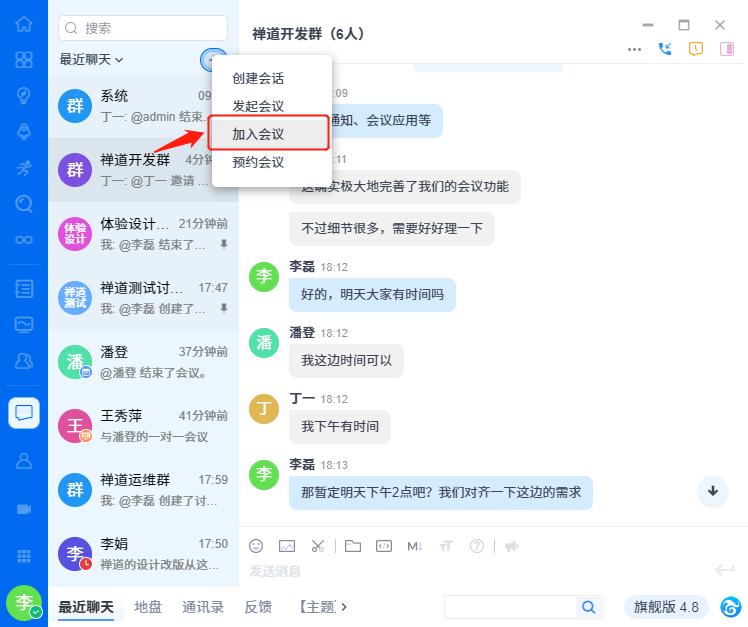
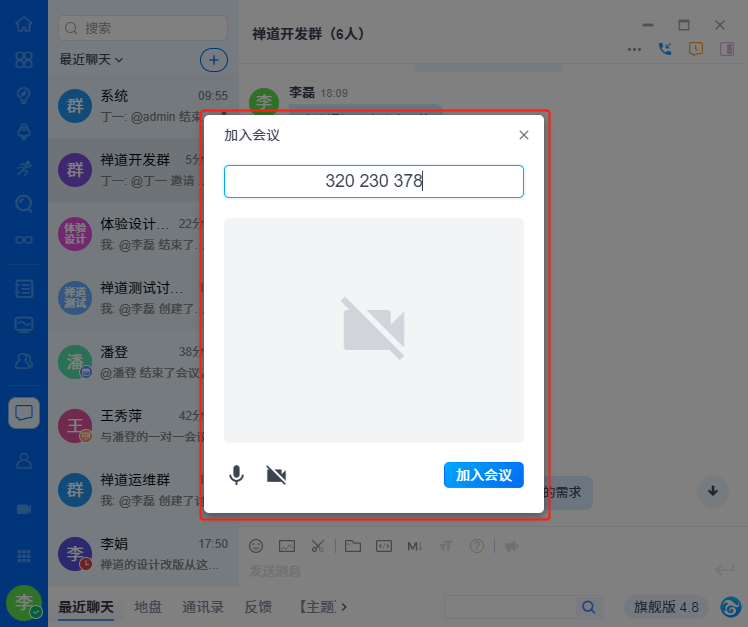
点击喧喧主界面左上角“+”选择菜单中的“加入会议”,显示加入会议弹窗。输入正确的ID,点击“确定”后进入会议。



联系我们


魏中显
高级客户经理
电话(微信)
18561939726
QQ号码
1746749398
联系邮箱
weizhongxian@chandao.com
联系我们


李木
高级客户经理
电话(微信)
18562583552
QQ号码
3985895121
联系邮箱
limu@chandao.com
!您的禅道专属服务通道已开启
感谢您的!为确保您能充分发挥禅道的价值,我们为您准备了以下专属服务:
 精品资料包
精品资料包立即获取《软件研发质量管理体系建设白皮书》、《PMO实践白皮书》《IPD资料》等行业最佳实践资料。
 1V1产品演示
为您量身定制线上演示,深度讲解核心功能与适用场景。
 免费试用增强功能
获取正式试用授权,解锁全部功能,带领团队亲身体验。
 专属顾问答疑支持
在使用中遇到的任何问题,您的专属顾问将及时为您解答。
添加您的专属顾问获取服务

扫码添加领专属服务